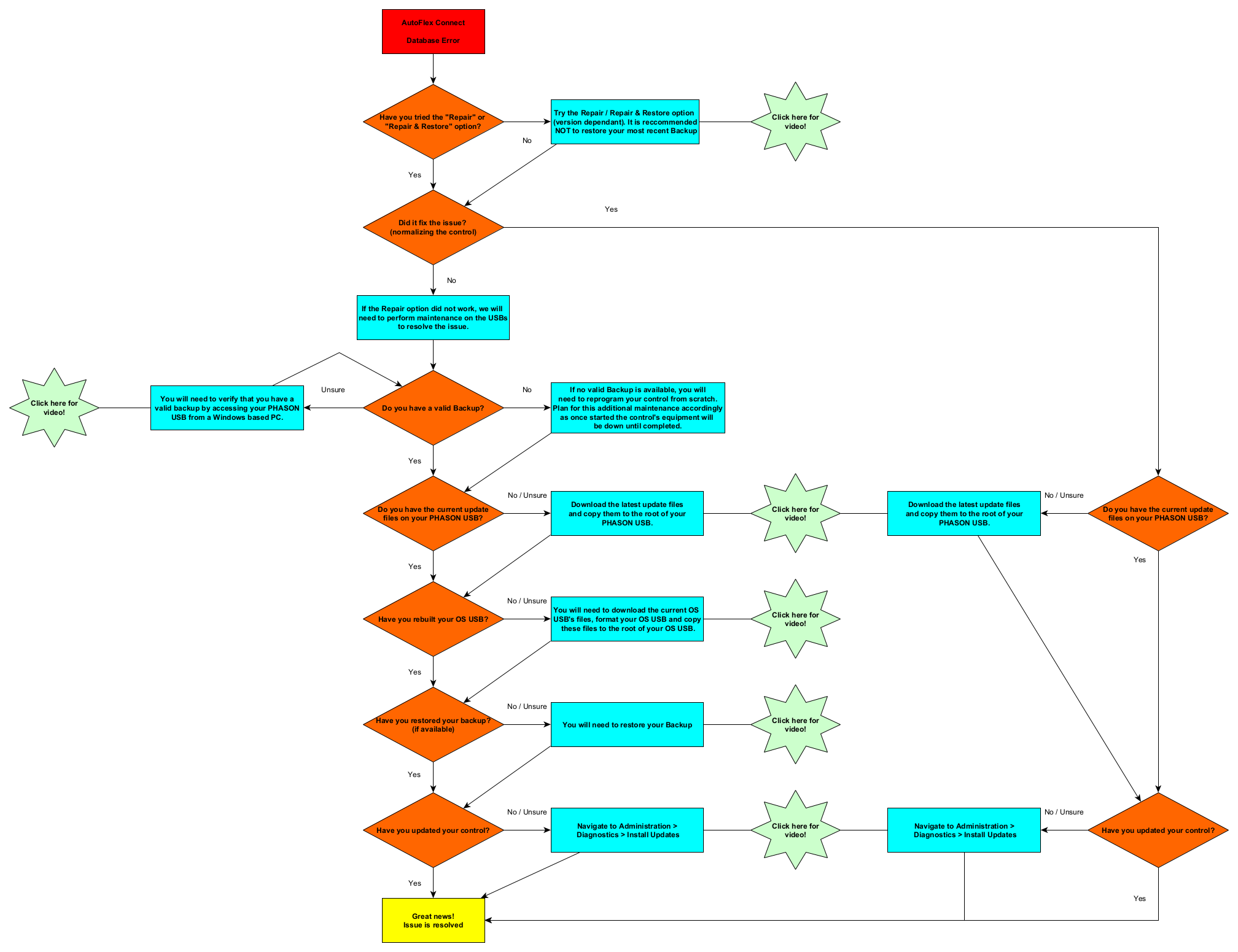
AutoFlex Connect
Database Error
Have you tried the "Repair" or
"Repair & Restore" option?
Did it fix the issue?
(normalizing the control)
Try the Repair / Repair & Restore option
(version dependant). It is reccommended
NOT to restore your most recent Backup
If the Repair option did not work, we will
need to perform maintenance on the USBs
to resolve the issue.
Do you have a valid Backup?
If no valid Backup is available, you will
need to reprogram your control from scratch.
Plan for this additional maintenance accordingly
as once started the control's equipment will
be down until completed.
You will need to verify that you have a
valid backup by accessing your PHASON
USB from a Windows based PC.
Do you have the current update
files on your PHASON USB?
00502 - Checking for Valid Backup
Have you rebuilt your OS USB?
Download the latest update files
and copy them to the root of your
PHASON USB.
00503 - Copying over Update Files
You will need to download the current OS
USB's files, format your OS USB and copy
these files to the root of your OS USB.
Have you restored your backup?
(if available)
You will need to restore your Backup
00504 - Rebuilding OS USB
00505 - Restoring Backup
Have you updated your control?
Great news!
Issue is resolved
Navigate to Administration >
Diagnostics > Install Updates
00506 - Launching Update
00501 - Repair/Restore
Have you updated your control?
Do you have the current update
files on your PHASON USB?
Download the latest update files
and copy them to the root of your
PHASON USB.
Navigate to Administration >
Diagnostics > Install Updates
No
Yes
No
Unsure
No
Yes
Yes
No / Unsure
No / Unsure
Yes
No / Unsure
Yes
Yes
No / Unsure
Yes
No / Unsure
Yes
No / Unsure
Yes